
Download VampAI – AI‑Powered Resume Builder, Free & Secure Tool
Overview
In today’s hyper‑competitive job market, a well‑crafted resume is often the first—and sometimes the only—chance to make a strong impression on hiring managers. VampAI steps in as a modern, AI‑driven solution that removes the guesswork from resume creation. Developed by Career Ready Pro, VampAI blends expertly designed templates with real‑time, AI‑generated suggestions to help job seekers produce CVs that are not only visually appealing but also optimized for applicant tracking systems (ATS).
The platform’s standout promise is simplicity: users can jump straight into building or polishing a resume without the friction of creating an account, making the tool instantly accessible from any device with a web browser. Whether you’re a fresh graduate, a mid‑career professional, or a senior executive, VampAI tailors its recommendations to match industry standards, ensuring each bullet point, headline, and skill set aligns with the expectations of recruiters across sectors. By delivering a secure, free‑to‑use service that supports multiple download formats (PDF, DOCX, and TXT), VampAI positions itself as a one‑stop shop for anyone looking to boost interview callbacks and accelerate their job search.
Key Features & How They Add Value
- Pre‑Designed Recruiter‑Approved Templates – A library of modern, ATS‑friendly layouts vetted by hiring professionals.
- AI‑Assisted Writing Engine – Generates tailored bullet points, summaries, and skill descriptions based on the role you target.
- Instant File Export – Download your finished resume in PDF, DOCX, or plain‑text format with a single click.
- No‑Account Required – Start building immediately; your data is stored securely for the duration of the session.
- Multi‑File Batch Download – Create several versions (e.g., different industries) and download them together.
- ATS Compatibility Checker – Real‑time feedback on how well your resume will parse through common tracking systems.
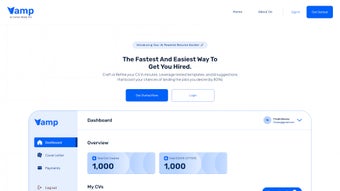
- Responsive Dashboard – Manage multiple resumes, switch templates, and preview changes on the fly.
- Secure Cloud Processing – All AI calculations happen over encrypted connections, ensuring privacy.
Each feature is designed with a specific pain point in mind. For example, the AI‑assisted writing engine eliminates the dreaded “writer’s block” by suggesting concise, impact‑driven statements that highlight measurable achievements. The ATS checker, on the other hand, scans your document for keywords, formatting issues, and section order, giving you a confidence boost that your resume won’t be discarded by automated filters. By bundling these capabilities into a free, web‑based interface, VampAI offers a level of professional polish that would otherwise require a costly career coach or premium software subscription.
Installation & Usage Instructions
Getting Started – No Download Required
VampAI is a cloud‑native application, which means you don’t need to install any software on your computer. Simply open a modern browser (Chrome, Edge, Firefox, or Safari) and navigate to the official VampAI URL. The homepage presents a clean “Start Building” button; clicking it launches the resume editor instantly.
Step‑by‑Step Workflow
- Select a Template: Browse the template gallery and pick one that matches your industry. Each preview shows how the final document will look on both desktop and mobile screens.
- Enter Personal Details: Fill in basic fields (name, contact, LinkedIn). The AI automatically formats these sections according to best practices.
- Choose a Role: Type the job title you’re applying for. VampAI’s language model pulls from millions of job postings to suggest relevant keywords.
- Generate Bullet Points: Use the “AI Suggest” button next to each experience entry. The tool proposes concise, achievement‑focused statements that you can edit or accept as‑is.
- Review & Optimize: Run the ATS checker. Any highlighted issues appear with actionable tips (e.g., “Add ‘project management’ keyword”).
- Download: Once satisfied, click the “Export” icon and choose your preferred file format. For multiple versions, select the batch download option.
The entire process typically takes under 15 minutes for a fresh resume and even less for an update, thanks to the AI’s ability to reuse existing content. If you need to pause, simply close the browser tab; your session data remains cached for up to 24 hours, ensuring you can resume without losing progress.
Compatibility & System Requirements
VampAI runs entirely in the browser, making it compatible with virtually any operating system that supports modern web standards. Whether you’re on Windows 10/11, macOS Monterey or later, a Linux distribution, or a mobile device running Android 10+ or iOS 13+, the interface adapts responsively to deliver a seamless experience. The only technical prerequisite is an up‑to‑date browser with JavaScript enabled and an internet connection. Because all processing occurs on secure cloud servers, even low‑end devices can leverage the full power of the AI engine without performance lag.
For users who prefer offline access, VampAI offers a “Download Template” option that provides a blank version of the chosen layout in DOCX format. You can then edit the file locally with Microsoft Word, Google Docs, or LibreOffice, though you’ll miss out on the real‑time AI suggestions and ATS validation. Nonetheless, the primary web‑based workflow remains the most efficient path for generating a recruiter‑ready resume quickly and securely.
Pros, Cons & Frequently Asked Questions
Pros
- Free to use with no hidden subscription fees.
- AI‑driven content suggestions save time and improve relevance.
- ATS‑compatible templates increase the chance of passing automated screening.
- No account required – instant access and privacy‑focused.
- Multi‑format export (PDF, DOCX, TXT) and batch download capability.
Cons
- Advanced customization (e.g., custom fonts) is limited to the provided templates.
- Internet connection required for AI features; offline editing is manual.
- While the AI is powerful, it may occasionally suggest generic phrasing that needs tweaking.
FAQ
Is VampAI really free or are there hidden charges?
VampAI offers a completely free tier that includes all core features—templates, AI suggestions, ATS checker, and unlimited downloads. There is no credit‑card requirement, and no premium subscription is needed to access the full functionality.
How does VampAI protect my personal data?
All data transmitted between your browser and VampAI’s servers is encrypted via HTTPS. Because the tool does not require account creation, no personal identifiers are stored long‑term. Session data is automatically cleared after 24 hours or when you manually end the session.
Can I use VampAI on a mobile device?
Yes. The web interface is fully responsive, allowing you to build, edit, and download resumes on smartphones and tablets running Android or iOS. The AI engine works the same way on mobile browsers as it does on desktop.
Do the templates work with all applicant tracking systems?
The templates are designed according to industry‑wide ATS guidelines (simple fonts, clear headings, no tables). While no template can guarantee 100 % compatibility with every proprietary system, the built‑in ATS checker flags any potential issues before you export.
What file formats can I download my resume in?
VampAI supports PDF for a polished, print‑ready version; DOCX for easy editing in Microsoft Word; and plain‑text (TXT) for systems that require a simple layout. Batch download lets you export all three formats simultaneously.
Conclusion & Call to Action
For job seekers who want a fast, professional, and AI‑enhanced way to craft their resumes, VampAI delivers an impressive blend of convenience, security, and recruiter‑focused design—all without demanding a subscription or personal account. Its ability to generate targeted bullet points, validate ATS compatibility, and output multiple file formats makes it a valuable ally in the modern hiring landscape. Whether you’re polishing an existing CV or starting from scratch, give VampAI a try and experience how artificial intelligence can transform a routine task into a strategic advantage. Download VampAI now and take the first step toward landing more interviews and accelerating your career trajectory.
VampAI stands out for its intuitive interface, powerful AI suggestions, and genuine free access. While it could benefit from deeper template customization, the overall experience is smooth and highly effective for boosting resume quality.



.png)



